
SmartAssist AI —
The AI HR Assistant Inside SmartHR
Ask anything about payroll, leave, attendance, gratuity and policies — and get instant, source-backed answers, right inside SmartHR.
SmartAssist AI is the AI-powered HR assistant built into the SmartHR HRMS. Employees, managers and HR teams ask questions in plain English — about payroll, leave, attendance, gratuity, company policies, reports and approvals — and SmartAssist AI answers instantly from your live SmartHR data and your approved HR documents. It also completes routine tasks such as leave requests, expense claims and approvals, always confirming before it acts. Built for UAE and GCC businesses, SmartAssist AI works entirely within your existing SmartHR permissions, so every user sees only what they are already authorised to see.
What is SmartAssist AI?
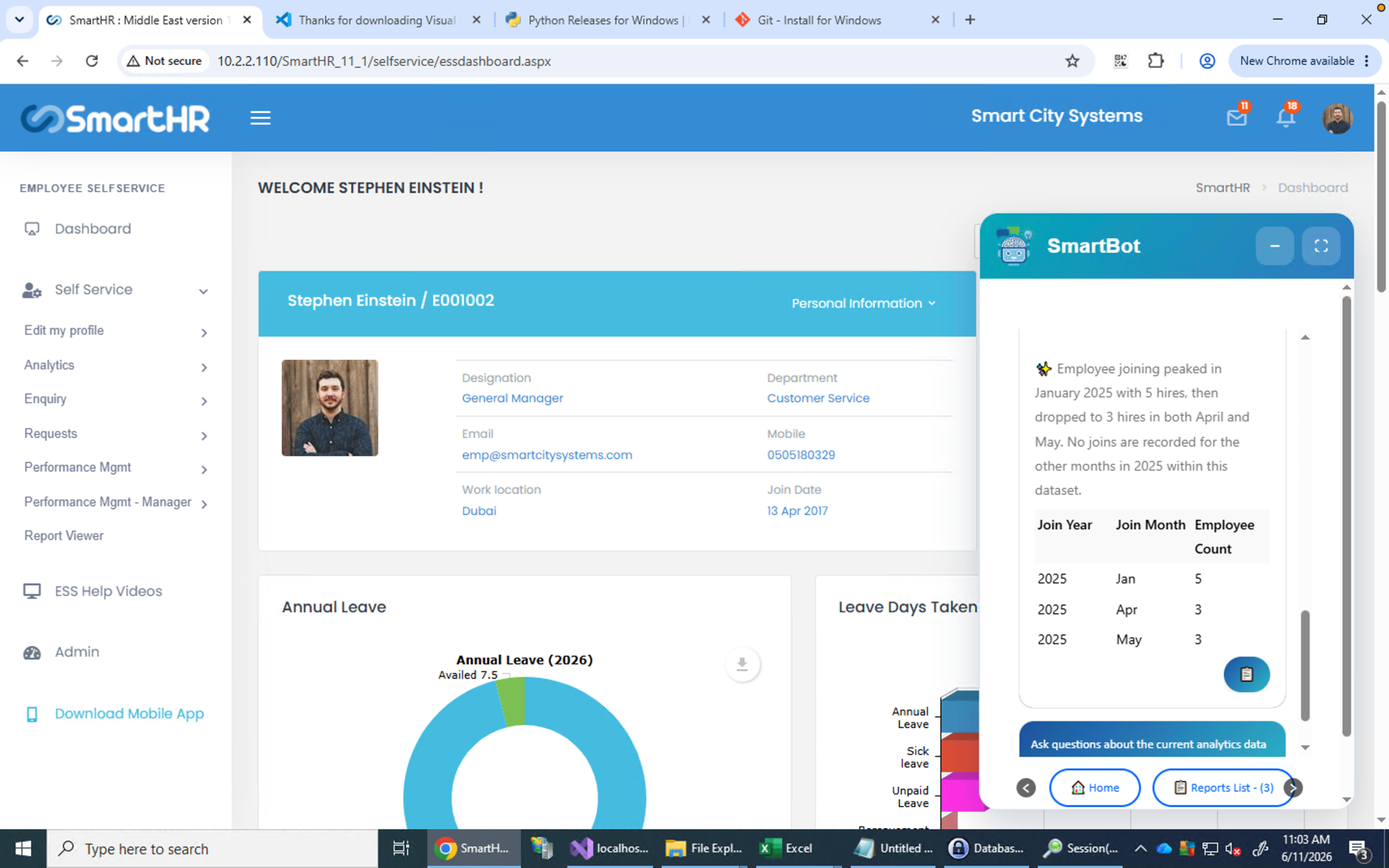
SmartAssist AI is an AI assistant inside SmartHR that lets your workforce get HR answers and complete HR tasks through simple conversation. It combines four capabilities in one chat: conversational analytics over your HR and payroll data, document search across your HR policies, self-service for employees and managers, and a video knowledge base for how-to guidance. SmartAssist AI reduces repetitive HR queries, speeds up reporting, and improves employee self-service — without ever expanding a user's access rights.
What it does —
What can SmartAssist AI do?
Conversational HR analytics
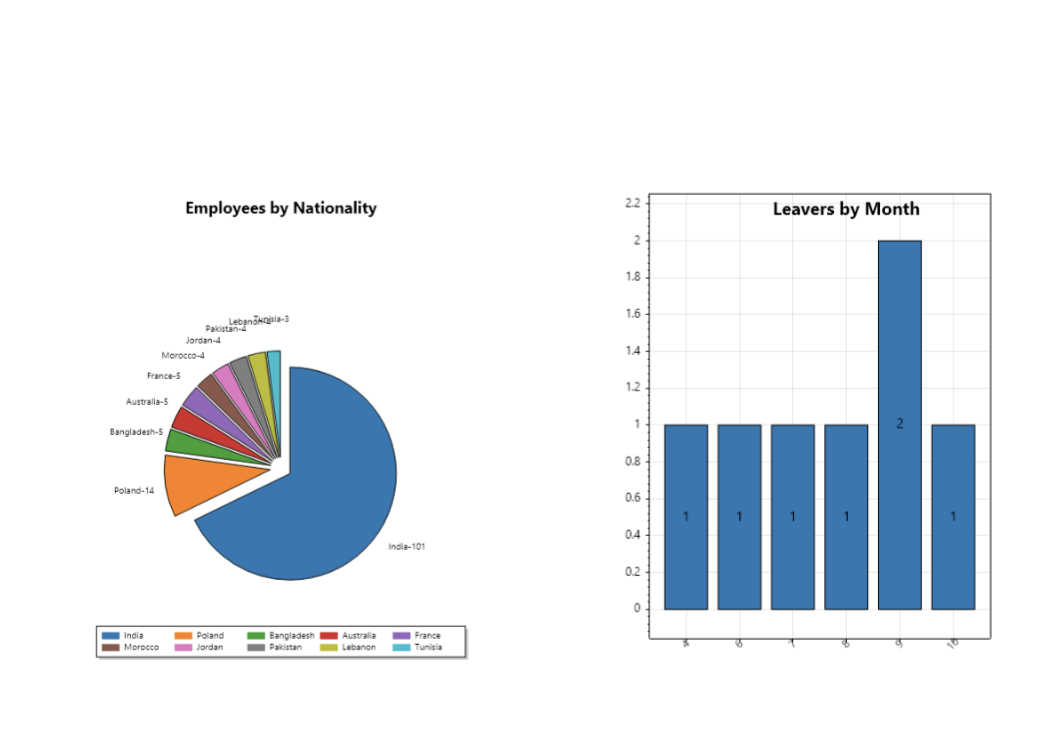
Ask questions about your SmartHR data in plain English and get tables, charts and summaries back — no manual reports or Excel exports. SmartAssist AI shows the data view and filters it used, so you can sense-check every result. Supported charts include pie, bar, line, donut, stacked and area. Frequently used questions can be saved and re-run as reports.
Examples:
- How many employees were paid in June?
- Show headcount by department.
- Show gross-pay variance between May and June.
- List employees whose probation is ending soon.
Smart Docs — answers from your HR policies
Instead of opening long PDFs, employees and managers ask a question and SmartAssist AI answers directly from the HR documents your team has uploaded — employee handbooks, leave and attendance policies, travel and expense rules, and other procedures — and shows the source document so the answer can be verified. (HR must upload documents to the SmartAssist AI Documents section before they can be searched.)
Examples:
- What is the annual leave carry-forward policy?
- “How do I claim travel expenses?
- What is the maternity leave policy?
- How is end-of-service / gratuity calculated here?
Self-service HR for employees and managers
SmartAssist AI acts as a 24/7 virtual HR assistant. Employees can view personal and employment details, check leave balances, submit leave requests, upload documents and create expense claims. Managers can review pending approvals, approve or decline requests, and access team information. Before any action is submitted, SmartAssist AI shows a summary and asks the user to confirm — decisions always remain with the employee or manager.
Examples:
- I want to apply for annual leave from 13/02/2026 to 14/02/2026 due to vacation and my contact number is 1234567890
- I want to submit a fuel expense claim of USD 100 incurred on 01/01/2026 for a client meeting.
Video knowledge base
Ask how to do something in SmartHR and SmartAssist AI replies with a short explanation plus links to the most relevant training videos — useful for onboarding and for reducing support requests.
Examples:
- How do I submit a timesheet?
- How do I apply for leave?
- How do I update my bank details?
Why teams choose it —
Why UAE and GCC HR teams choose SmartAssist AI
HR teams in the UAE manage multi-entity operations, WPS payroll, gratuity and end-of-service calculations, leave and attendance rules, approvals and labour-law compliance. SmartAssist AI brings all of it into one conversation — and four things set it apart:
Built inside SmartHR, not bolted on
Answers reflect your live SmartHR payroll, leave and employee data — not a disconnected chatbot.
Answers you can verify
Policy answers come from your approved documents with the source shown; analytics answers show the data view and filters used.
Compliance-aware
Ask about WPS payroll, gratuity / end-of-service entitlements, leave policy or UAE Labour Law and get answers grounded in your configured rules and uploaded policies.
Safe by design
SmartAssist AInever expands a user's permissions and confirms every action before it runs.
How does SmartAssist AI keep HR data secure and compliant?
SmartAssist AI works entirely within SmartHR's role-based access controls — employees and managers see only the data they are already entitled to view, and SmartAssist AI never expands anyone's access. Your data is processed within Smart City Systems' controlled, private cloud environment, is not used to train AI models, and is not shared with other customers or external AI systems.
Who it's for —
Who uses SmartAssist AI ?
Payroll teams
review paid employees, payroll variance, gross-pay differences, salary revisions and monthly summaries.
HR teams
analyse headcount, joiners and leavers, probation, leave and attendance trends, documents and records.
Managers
check team information, review and approve requests, and monitor pending actions.
Employees
ask HR questions, check leave balances, submit requests, update documents and find training help.
In practice —
Questions you can ask SmartAssist AI
HR analytics:
- How many active employees do we have?
- Show headcount by nationality (top five plus UAE).
- Show leavers by month and reason.
Payroll & compliance:
- How many employees were paid in June 2025?
- Show gross-pay variance between May and June.
- How is gratuity / end-of-service calculated for this employee?
Leave & attendance:
- Show sick leave by department and month.
- Show work hours and additional hours for March 2026.
- Display this employee's leave balance.
Policies (Smart Docs):
- What is the annual leave policy?
- What documents are required for reimbursement?
- How do I request an IT asset?
Self-service:
- I want to apply for annual leave from 13/02/2026 to 14/02/2026 due to vacation and my contact number is 1234567890
- I want to submit a fuel expense claim of USD 100 incurred on 01/01/2026 for a client meeting.
SmartAssist AI —
Frequently asked questions
SmartAssist AI is the AI-powered HR assistant built into SmartHR. It answers HR questions, analyses payroll and workforce data, searches your policy documents, helps submit and approve requests, and links to training content — all within each user's existing permissions.
SmartAssist AI uses your question, the underlying large language model, and your SmartHR data to give the best answer it can, but as with any AI assistant you should review results before relying on them. In analytics, SmartAssist AI shows the data view and filters it applied so you can sense-check that the result is reasonable.
Not necessarily. SmartAssist AI is powered by a large language model and responds based on the context available at the time, so it may phrase or structure answers differently. The underlying data always comes from your SmartHR system.
Yes. Employees can submit leave requests, update documents, create claims and view HR information through simple conversations.
Yes. Managers can review pending requests and approve or decline them after confirming the action.
SmartAssist AI follows SmartHR's role-based access controls and never expands a user's permissions — everyone sees only the data they are already entitled to. Data is processed in a private, controlled environment, is not used to train AI models, and is designed to align with regional data-protection laws
Yes. Smart Docs answers questions from the HR handbooks, policies and procedures your team uploads, and references the source document so users can verify the information.
Book a SmartAssist AI demo
Bring AI-powered HR self-service to your organisation. SmartAssist AI helps UAE and GCC businesses cut manual support requests, speed up reporting, and deliver a better employee experience across HR, payroll, analytics and self-service.
