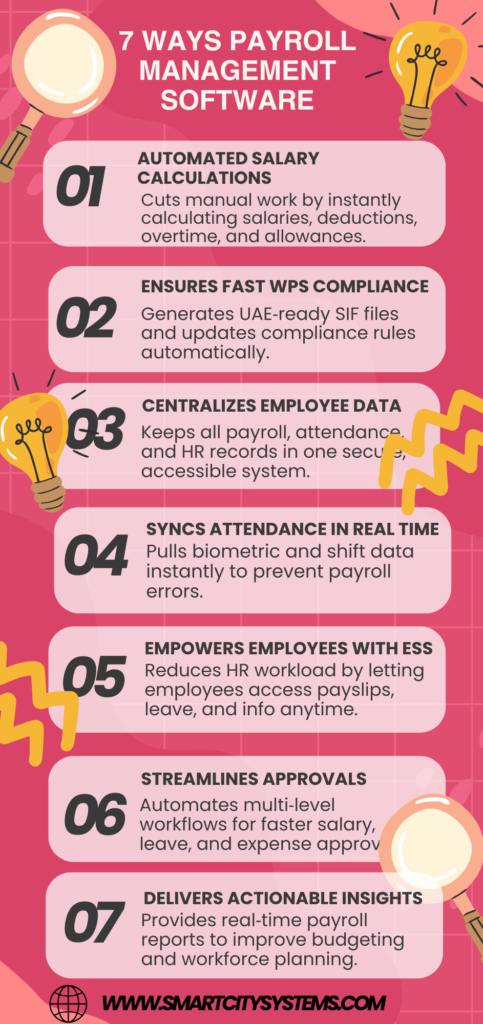
7 Ways Payroll Management Software Increases Business Efficiency Payroll administration is one of the most important responsibilities for any business. Employees expect to be paid accurately and on time, while businesses must comply with tax regulations, labor laws, and reporting requirements. However, handling payroll manually can be time-consuming, error-prone, and stressful. Payroll management software is crucial in this situation. It reduces administrative responsibilities, automates tedious payroll tasks, and enhances business operations. Think of payroll software as the engine of a car—when it runs smoothly, the entire business moves forward without unnecessary delays. Whether you own a small business or manage a growing enterprise, payroll software can transform how you handle employee compensation and workforce management. Understanding Payroll Management Software Payroll management software is a digital solution designed to automate payroll-related activities. These consist of payroll reporting, direct deposits, overtime monitoring, tax deductions, attendance integration, and salary computations. Businesses can use a centralized platform to expedite payroll procedures rather than depending on spreadsheets and manual calculations. This reduces complexity and ensures payroll operations remain organized and efficient. Why Business Efficiency Matters The capacity to accomplish goals with the least amount of time, effort, and resources is known as business efficiency. Effective businesses might focus more on growth, innovation, and customer service rather than on administrative tasks. Payroll is one of the most repetitive administrative functions. Enhancing payroll efficiency has a direct effect on the productivity of the entire company, freeing up more time for strategic tasks for the finance and HR departments. Automates Payroll Processing Eliminates Repetitive Tasks Automation is one of the main benefits of payroll management software. Instead of manually calculating salaries every month, the software automatically processes: Basic salaries Overtime payments Bonuses and incentives Tax deductions Leave deductions Employee benefits Automation significantly reduces the workload on HR and finance teams. Ensures Consistent Payroll Cycles Automated workflows help businesses maintain consistent payroll schedules. Employees receive their salaries on time, every time, without delays caused by manual processing. Increases Productivity Employees may concentrate on higher-value tasks like workforce planning, employee engagement, and performance management when payroll processing is automated. Reduces Human Errors Minimizes Calculation Mistakes Manual payroll calculations often result in errors involving: Salary computations Tax deductions Overtime payments Benefits calculations Even a small mistake can create employee dissatisfaction and compliance issues. Payroll software uses predefined formulas to ensure accurate calculations. Improves Data Accuracy Automated systems eliminate duplicate entries and reduce the risk of incorrect information being entered into payroll records. Builds Trust Payroll processing that is accurate fosters trust between companies and employees. Workers feel more confident when they consistently receive correct payments. Saves Valuable Time Faster Payroll Processing Traditional payroll methods may require several days to complete each month. Payroll management software can process payroll in a matter of hours or even minutes. Quick Access to Information HR managers can instantly retrieve employee payroll records, tax documents, and salary histories without searching through stacks of paperwork. Streamlined Approvals Many payroll systems include automated approval workflows, making it easier for managers to review and approve payroll information quickly. The time saved translates directly into increased operational efficiency. Enhances Compliance Management Stays Updated with Regulations Tax laws and labor regulations frequently change. Payroll software automatically updates compliance requirements, helping businesses remain compliant. Reduces Legal Risks Compliance failures can result in penalties, fines, and legal complications. Payroll software helps businesses avoid costly mistakes by applying the latest tax and labor rules. Generates Compliance Reports Most payroll systems provide built-in compliance reports that simplify audits and regulatory submissions. By automating compliance tasks, businesses can reduce risks while improving operational reliability. Improves Employee Satisfaction Timely Salary Payments Employees value receiving their salaries on time. Payroll software ensures timely payments through automated scheduling and direct deposit capabilities. Self-Service Portals Many modern payroll systems provide employee self-service portals where workers can: View payslips Download tax documents Update personal information Track leave balances This convenience improves employee experiences and reduces HR inquiries. Greater Transparency Payroll information is readily accessible to employees, fostering transparency and lowering misunderstandings over wage computations. Simplifies Record Keeping Centralized Data Storage Payroll software stores all payroll-related information in a single database. This includes: Employee records Salary histories Tax documents Attendance data Benefits information Easy Retrieval Finding payroll records becomes simple and fast, especially during audits or employee inquiries. Improved Data Security Digital payroll systems often include advanced security measures such as encryption, access controls, and automated backups to protect sensitive employee information. Provides Real-Time Reporting Better Decision-Making Real-time reports produced by payroll software assist management in making wise business decisions. Payroll Cost Analysis Businesses can analyze payroll expenses by department, project, or location to identify opportunities for optimization. Workforce Insights Detailed reports provide valuable insights into: Labor costs Overtime trends Employee attendance Compensation patterns These insights support smarter workforce management strategies. Supports Business Growth Scales with Your Organization As companies grow, payroll complexity increases. Payroll software can easily accommodate: More employees Multiple departments Multiple locations Different pay structures Reduces Administrative Burden Growing businesses often struggle with increasing administrative tasks. Payroll automation prevents payroll management from becoming a bottleneck. Supports Expansion Whether hiring locally or internationally, payroll software provides the flexibility needed to support expansion plans efficiently. Integration with HR Systems Creates a Unified Workforce Platform Payroll software nowadays frequently connects with platforms for recruitment, attendance tracking, and HR administration. Eliminates Duplicate Data Entry Employee information entered once can automatically flow across multiple systems, reducing administrative work. Improves Accuracy Integrated systems ensure consistency across HR and payroll records, minimizing discrepancies. Cost Reduction Benefits Lower Administrative Costs Manual payroll processing requires significant labor hours. Automation reduces these costs substantially. Fewer Payroll Errors Payroll mistakes can be expensive. Correcting errors consumes time and resources, while compliance penalties can be even more costly. Reduced Paper Usage Digital payroll systems reduce reliance on printed payslips, forms, and reports, contributing to both cost savings and environmental sustainability. Choosing the Right Payroll Software Assess Your Business Needs Every organization has unique payroll requirements. Consider factors such as: Company size Industry requirements Compliance needs Integration requirements Look for Essential Features Important features include: Automated payroll processing Tax management Employee self-service Reporting capabilities Mobile accessibility Security features Evaluate Vendor Support Long-term profitability depends on consistent software updates and dependable customer service.
Smart HR Payroll Software
Tired of Manual Payroll? Switch to Smart HR Payroll Software Today Introduction Let’s be honest—manual payroll is exhausting. If you’ve ever spent hours calculating salaries, deductions, and taxes only to discover a small mistake, you already know the frustration. It’s like trying to solve a puzzle where one wrong piece messes up the entire picture. Now imagine a smarter way. A system that handles everything automatically, reduces errors, and gives you peace of mind. That’s exactly what Smart HR Payroll Software does. Whether you’re a business owner, HR manager, or someone curious about improving payroll efficiency, this guide will help you understand why switching today is a smart move. What Payroll Is and Why It Is Important Payroll is more than just paying employees. It includes calculating salaries, taxes, bonuses, deductions, and ensuring everything is accurate and on time. Why does it matter? Because payroll directly impacts employee trust. If salaries are delayed or incorrect, it can damage morale and even your company’s reputation. The Challenges of Manual Payroll Manual payroll might seem manageable at first, but as your business grows, it becomes a burden. Common challenges include: Time-consuming calculations High risk of human errors Difficulty tracking records Compliance issues with regulations Think of manual payroll like writing letters by hand in a world of emails—slow, outdated, and prone to mistakes. What is Smart HR Payroll Software Smart HR Payroll Software is a digital solution designed to automate payroll processes. It handles everything from salary calculations to tax compliance with minimal human effort. Instead of juggling spreadsheets, you get a centralized system that does the heavy lifting for you. Key Features of Smart Payroll Systems Automation of Payroll Tasks: No more manual calculations. The system automatically processes salaries and deductions. Tax Management: It calculates taxes accurately and ensures compliance with local laws. Employee Self-Service Portal: Employees can view payslips, apply for leave, and access records anytime. Reporting and Analytics: Generate reports instantly to track expenses and payroll trends. Benefits of Switching to Payroll Software Switching to payroll software isn’t just an upgrade—it’s a transformation. Key benefits include: Increased efficiency Better accuracy Time savings Improved compliance You move from chaos to control in just a few clicks. How Payroll Software Saves Time Time is money, right? Payroll software reduces hours of work to minutes. Instead of spending days calculating salaries, the system completes tasks instantly. This frees up your HR team to focus on strategic activities rather than repetitive tasks. Reducing Errors and Compliance Risks Payroll mistakes can be costly. From incorrect salaries to legal penalties, errors can hurt your business. Smart payroll systems: Minimize human errors Automatically update tax rules Ensure compliance with labor laws This means fewer headaches and more confidence. Improving Employee Satisfaction Happy employees are productive employees. When payroll is prompt and correct: Employees feel valued Trust in the organization increases Queries and complaints decrease It’s a small adjustment that has a significant impact.. Cost-Effectiveness of Automation First, investing in payroll software may seem expensive. But in reality, it saves money in the long run. How? Reduces manual labor costs Prevents costly errors Improves efficiency It’s like switching from a fuel-heavy car to an electric one—initial investment, long-term savings. Integration with HR Systems Modern payroll software integrates seamlessly with other HR tools. Examples include: Attendance tracking Leave management Performance management As a result, an integrated system is created where all components function seamlessly. Cloud-Based Payroll Advantages Cloud technology has changed the game. Benefits of cloud-based payroll: Access from anywhere Real-time updates Secure data storage Whether you’re in the office or working remotely, your payroll system is always within reach. Choosing the Right Payroll Software Not all payroll systems are the same. Making the right choice is crucial. Look for: User-friendly interface Customization options Strong security features Reliable customer support Ask yourself: Does this solution fit my business needs? Implementation Made Easy Worried about switching? Don’t be. Most payroll software solutions offer: Easy setup Data migration support Training for your team Contrary to popular belief, the transfer goes more smoothly. Future of Payroll Technology Payroll is evolving rapidly with technology. Future trends include: AI-powered automation Advanced analytics Mobile accessibility Early adaptation will keep businesses ahead of the competition. Conclusion Manual payroll is no longer practical in today’s fast-paced world. It’s time-consuming, error-prone, and stressful. On the other hand, Smart HR Payroll Software offers a simple, efficient, and reliable solution. By making the switch, you’re not just upgrading your payroll process—you’re improving your entire business operation. So, why stick to the old ways when a smarter option is right in front of you? FAQs 1. What is Smart HR Payroll Software? It is a digital solution that automates payroll processes, including salary calculations, tax deductions, and compliance. 2. Is payroll software appropriate for small companies? Yes, payroll software is scalable and works well for businesses of all sizes, including startups and SMEs. 3. How secure is payroll software? Most modern payroll systems use advanced security measures to protect sensitive employee data. 4. Can payroll software handle tax compliance? Yes, it automatically calculates taxes and ensures compliance with local regulations. 5. How long does it take to implement payroll software? Implementation can take a few days to a few weeks, depending on the complexity and size of the organization.
Payroll Software Dubai
Common Problems with Payroll Software You Need to Know Introduction Let’s be honest—payroll is one of those tasks no business can afford to mess up. After all, it’s about paying people correctly and on time. But what happens when the very tool meant to simplify this process—your payroll software—starts causing headaches instead? If you’ve ever dealt with delayed salaries, incorrect tax calculations, or confusing reports, you’re not alone. Payroll software can be a lifesaver, but it’s not perfect. Think of it like a car: it gets you where you need to go, but only if it’s well-maintained and used correctly. In this article, we’ll walk through the most common problems with payroll software you need to know—so you can avoid costly mistakes and keep your operations running smoothly. Data Entry Errors Manual mistakes can ruin everything. Even with automation, payroll systems still rely on human input. A minor error in salary, working hours, or deductions can lead to significant discrepancies. Imagine accidentally adding an extra zero to someone’s paycheck—sounds scary, right? Key issues include: Incorrect employee details Wrong attendance inputs Duplicate records Solution: Double-check entries and use validation tools within the software. Incorrect Tax Calculations Tax errors can lead to penalties. Payroll software is supposed to calculate taxes accurately, but outdated tax rules or incorrect configurations can cause serious problems. Common problems: Miscalculated deductions Failure to apply new tax laws Incorrect regional tax settings Solution: Regularly update tax settings and ensure compliance with local regulations. Integration Issues When systems don’t talk, problems start. Payroll software often needs to integrate with HR, accounting, and attendance systems. If these integrations fail, data mismatches occur. Typical challenges: Sync errors Missing employee data Duplicate entries across platforms Solution: Choose software with strong integration capabilities and test regularly. Lack of Customization One size doesn’t fit at all. Every business has unique payroll needs. Some software solutions are too rigid, making it difficult to integrate with your existing processes. Problems include: Limited payroll structures Fixed salary components Inflexible workflows Solution: Opt for software that allows customization based on your business requirements. Compliance Challenges Staying compliant is harder than it looks. Payroll regulations change frequently. If your software doesn’t keep up, your business could face legal trouble. Key risks: Non-compliance with labor laws Incorrect statutory deductions Missing compliance reports Solution: Use software that updates automatically with legal changes. User Interface Complexity If it’s hard to use, it won’t be used properly. Some payroll systems are overly complicated, especially for non-technical users. Common complaints: Confusing dashboards Too many steps for easy activities Lack of clear instructions Solution: Choose user-friendly software with intuitive navigation. Poor Customer Support What happens when you need help? When payroll issues arise, you need quick support. Unfortunately, not all providers offer reliable assistance. Problems include: Slow response times Limited support channels Lack of technical expertise Solution: Select a provider known for strong customer service. Security Risks Payroll data is sensitive. Employee salaries, bank details, and personal information must be protected. Defective security can lead to data breaches. Potential risks: Unauthorized access Data leaks Weak encryption Solution: Use software with advanced security features like encryption and multi-factor authentication. Software Downtime Time is money—literally. If your payroll system crashes during processing, it can delay payments and create chaos. Common causes: Server issues System overload Maintenance downtime Solution: Choose reliable, cloud-based systems with high uptime guarantees. Hidden Costs The price tag isn’t always clear. Some payroll software comes with hidden fees that catch businesses off guard. Examples include: Extra charges for features Fees for updates or support Costs for additional users Solution: Always review pricing structures carefully before purchasing. Limited Reporting Features Data may only be used if it is understandable. Reports help businesses make informed decisions. But some payroll systems offer limited or confusing reports. Common issues: Lack of customization Incomplete data insights Difficult-to-read formats Solution: Look for software with advanced reporting and analytics tools. Scalability Problems Can your software grow with you? As your business expands, your payroll needs become more complex. Not all systems can handle growth. Problems include: Limited employee capacity Performance slowdowns Inability to handle multiple locations Solution: Choose scalable software that adapts to your business size. Employee Self-Service Issues Empower employees—but not at a cost. Self-service portals allow employees to access payslips and update details. However, poorly designed portals can create confusion. Common problems: Login issues Inaccurate data display Limited functionality Solution: Ensure the portal is user-friendly and regularly updated. Frequent Updates and Bugs Updates need to address issues rather than introduce new ones. While updates are necessary, frequent bugs can disrupt payroll processes. Issues include: System crashes after updates Feature malfunctions Unexpected errors Solution: Use software with stable releases and proper testing. Data Migration Difficulties Switching systems isn’t always smooth. Moving data from one payroll system to another can be complex and risky. Challenges include: Data loss Incorrect data mapping Time-consuming processes Solution: Plan migrations carefully and use professional support if needed. Conclusion Payroll software is a powerful tool—but like any tool, it’s only as good as how you use it. From data entry errors to security risks, these common problems can disrupt your business if not handled properly. The good news? Most of these issues are preventable. By choosing the right software, staying updated, and training your team, you can turn payroll from a stressful task into a smooth, reliable process. Think of it this way: payroll isn’t just about numbers—it’s about trust. And getting it right keeps your employees happy and your business running strong. FAQs 1. What is the most common problem with payroll software? The most common issue is data entry errors, which can lead to incorrect salaries, deductions, and reports. 2. How can payroll software errors be reduced? Regular updates, proper training, and double-checking data entries can significantly reduce errors. 3. Why is payroll software compliance important? Compliance ensures your business follows legal regulations, avoiding penalties and legal issues. 4. Is it possible for payroll software to interface with other systems? Although integration problems sometimes arise, the majority of contemporary payroll systems do integrate with HR, accounting, and attendance systems. 5. Is cloud-based payroll software better? Cloud-based systems are generally more reliable, scalable, and secure compared to traditional software solutions.