
How an HRIS System Simplifies HR and Payroll Management in Dubai Managing employees is no longer just about maintaining attendance records or calculating salaries. As businesses in Dubai continue to expand across industries, HR teams face increasing pressure to manage recruitment, employee records, payroll, compliance, performance, and reporting—all while delivering a great employee experience. So, how can organizations handle these growing responsibilities without overwhelming their HR departments? The answer lies in implementing a modern HRIS (Human Resource Information System). Think of an HRIS as the central nervous system of your business. Just as the human brain coordinates different parts of the body, an HRIS connects every HR and payroll process into one intelligent platform. Instead of juggling spreadsheets, paperwork, and disconnected software, organizations can automate routine tasks and focus on building a productive workforce. Whether you’re a startup, SME, or a large enterprise operating in Dubai, an HRIS system can help improve efficiency, reduce payroll errors, strengthen compliance, and enhance employee satisfaction. What Is an HRIS System? A Human Resource Information System (HRIS) is software designed to manage all HR functions from a single platform. It combines employee information, payroll, attendance, leave management, recruitment, performance evaluation, and reporting into one centralized system. Instead of using multiple applications for different HR activities, organizations can perform everything from one dashboard. An HRIS helps businesses: Store employee information securely Automate HR processes Reduce paperwork Improve payroll accuracy Generate reports instantly Support better business decisions Simply put, it transforms HR from an administrative department into a strategic business function. Why Businesses in Dubai Need an HRIS Dubai is home to businesses of every size—from startups to multinational corporations. Managing a diverse workforce requires speed, accuracy, and compliance. Manual HR processes often create challenges, such as: Payroll mistakes Lost employee documents Delayed approvals Attendance discrepancies Compliance risks Time-consuming reporting An HRIS eliminates these problems through automation. Businesses in Dubai also need to comply with labor regulations while maintaining accurate employee records. An integrated HRIS makes these tasks significantly easier. Key Features of a Modern HRIS Today’s HRIS solutions offer much more than employee record management. Some of the most valuable features include: Employee Database Maintain complete employee profiles, including contracts, qualifications, passports, visas, certifications, and emergency contacts. Payroll Management Automate salary calculations, deductions, overtime, bonuses, and payroll reports. Leave Management Employees can apply for leave online while managers approve requests with a few clicks. Attendance Tracking Integrate biometric devices, mobile attendance, or web-based check-ins. Performance Management Monitor employee goals, KPIs, appraisals, and development plans. Recruitment Track applicants from job posting to hiring. Reporting Dashboard Generate HR insights instantly using customizable reports. Simplifying Employee Data Management One of the biggest advantages of an HRIS is centralized employee information. Instead of maintaining multiple spreadsheets and filing cabinets, every employee record is stored securely in one location. HR teams can quickly access: Employment history Salary records Promotion history Leave balances Attendance records Training certificates Contract renewals This reduces administrative work while improving data accuracy. It also minimizes duplicate records and eliminates unnecessary paperwork. Streamlining Payroll Processing Payroll is one of the most critical HR functions. Even a small mistake can affect employee trust. An HRIS automates payroll calculations using predefined rules. It automatically processes: Basic salary Allowances Overtime Leave deductions Bonuses Incentives Tax calculations (where applicable) End-of-service benefits Payroll reports can be generated within minutes instead of hours. Automation also reduces manual calculation errors, saving both time and money. Time and Attendance Integration Attendance directly affects payroll accuracy. Modern HRIS platforms integrate with: Biometric devices Face recognition systems Mobile attendance apps GPS-based attendance Web clock-in systems Attendance data flows directly into payroll without manual entry. This ensures: Accurate salary calculations Reduced payroll disputes Better workforce planning Improved employee accountability Managers also receive real-time attendance reports for faster decision-making. Employee Self-Service Portal Employees today expect convenience. An Employee Self-Service (ESS) portal allows staff to manage many HR activities independently. Employees can: View payslips Apply for leave Check attendance Update personal details Download documents Submit reimbursement claims Track approval status This reduces HR workload while giving employees greater control over their information. It also improves transparency across the organization. Recruitment and Onboarding Automation Hiring talented employees is essential for business growth. An HRIS simplifies recruitment by managing every stage of the hiring process. Features include: Online job postings Resume management Candidate tracking Interview scheduling Offer letter generation Digital onboarding New employees can complete onboarding forms before joining the organization. HR teams spend less time on paperwork and more time finding the right talent. Performance Management and Employee Growth Employee performance directly impacts business success. Modern HRIS systems help organizations create structured performance management processes. Managers can: Set measurable goals Conduct regular appraisals Monitor KPIs Provide feedback Identify training needs Employees gain a clear understanding of expectations and career development opportunities. Continuous performance tracking also encourages higher productivity and engagement. HR Compliance in Dubai Compliance is a top priority for businesses operating in Dubai. Organizations must maintain accurate employee records and comply with applicable labor regulations. An HRIS supports compliance by: Maintaining digital employee documentation Tracking contract expiry dates Monitoring visa renewals Recording employee leave Maintaining payroll records Generating audit-ready reports Automated reminders help HR teams avoid missing important deadlines. This reduces compliance risks while improving operational confidence. Reporting and Business Analytics Good decisions rely on reliable data. An HRIS provides real-time dashboards that transform raw data into meaningful business insights. Organizations can monitor: Employee turnover Attendance trends Payroll costs Leave statistics Recruitment performance Department productivity Workforce demographics Instead of spending hours preparing reports, HR managers can generate them instantly. These insights help leadership make informed workforce decisions. Benefits for HR Teams and Employees An HRIS creates value across the organization. Benefits for HR Reduced manual work Faster payroll processing Improved compliance Better reporting Increased productivity Enhanced data security Benefits for Employees Faster HR services Easy access to information Transparent leave management Online payslips Quick approvals Improved communication When HR processes become easier, everyone benefits. Choosing the Right HRIS System Not
HRIS System in Dubai
How an HRIS System Simplifies HR and Payroll Management in Dubai Managing employees is no longer just about maintaining attendance records or calculating salaries. As businesses in Dubai continue to expand across industries, HR teams face increasing pressure to manage recruitment, employee records, payroll, compliance, performance, and reporting—all while delivering a great employee experience. So, how can organizations handle these growing responsibilities without overwhelming their HR departments? The answer lies in implementing a modern HRIS (Human Resource Information System). Think of an HRIS as the central nervous system of your business. Just as the human brain coordinates different parts of the body, an HRIS connects every HR and payroll process into one intelligent platform. Instead of juggling spreadsheets, paperwork, and disconnected software, organizations can automate routine tasks and focus on building a productive workforce. Whether you’re a startup, SME, or a large enterprise operating in Dubai, an HRIS system can help improve efficiency, reduce payroll errors, strengthen compliance, and enhance employee satisfaction. What Is an HRIS System? A Human Resource Information System (HRIS) is software designed to manage all HR functions from a single platform. It combines employee information, payroll, attendance, leave management, recruitment, performance evaluation, and reporting into one centralized system. Instead of using multiple applications for different HR activities, organizations can perform everything from one dashboard. An HRIS helps businesses: Store employee information securely Automate HR processes Reduce paperwork Improve payroll accuracy Generate reports instantly Support better business decisions Simply put, it transforms HR from an administrative department into a strategic business function. Why Businesses in Dubai Need an HRIS Dubai is home to businesses of every size—from startups to multinational corporations. Managing a diverse workforce requires speed, accuracy, and compliance. Manual HR processes often create challenges, such as: Payroll mistakes Lost employee documents Delayed approvals Attendance discrepancies Compliance risks Time-consuming reporting An HRIS eliminates these problems through automation. Businesses in Dubai also need to comply with labor regulations while maintaining accurate employee records. An integrated HRIS makes these tasks significantly easier. Key Features of a Modern HRIS Today’s HRIS solutions offer much more than employee record management. Some of the most valuable features include: Employee Database Maintain complete employee profiles, including contracts, qualifications, passports, visas, certifications, and emergency contacts. Payroll Management Automate salary calculations, deductions, overtime, bonuses, and payroll reports. Leave Management Employees can apply for leave online while managers approve requests with a few clicks. Attendance Tracking Integrate biometric devices, mobile attendance, or web-based check-ins. Performance Management Monitor employee goals, KPIs, appraisals, and development plans. Recruitment Track applicants from job posting to hiring. Reporting Dashboard Generate HR insights instantly using customizable reports. Simplifying Employee Data Management One of the biggest advantages of an HRIS is centralized employee information. Instead of maintaining multiple spreadsheets and filing cabinets, every employee record is stored securely in one location. HR teams can quickly access: Employment history Salary records Promotion history Leave balances Attendance records Training certificates Contract renewals This reduces administrative work while improving data accuracy. It also minimizes duplicate records and eliminates unnecessary paperwork. Streamlining Payroll Processing Payroll is one of the most critical HR functions. Even a small mistake can affect employee trust. An HRIS automates payroll calculations using predefined rules. It automatically processes: Basic salary Allowances Overtime Leave deductions Bonuses Incentives Tax calculations (where applicable) End-of-service benefits Payroll reports can be generated within minutes instead of hours. Automation also reduces manual calculation errors, saving both time and money. Time and Attendance Integration Attendance directly affects payroll accuracy. Modern HRIS platforms integrate with: Biometric devices Face recognition systems Mobile attendance apps GPS-based attendance Web clock-in systems Attendance data flows directly into payroll without manual entry. This ensures: Accurate salary calculations Reduced payroll disputes Better workforce planning Improved employee accountability Managers also receive real-time attendance reports for faster decision-making. Employee Self-Service Portal Employees today expect convenience. An Employee Self-Service (ESS) portal allows staff to manage many HR activities independently. Employees can: View payslips Apply for leave Check attendance Update personal details Download documents Submit reimbursement claims Track approval status This reduces HR workload while giving employees greater control over their information. It also improves transparency across the organization. Recruitment and Onboarding Automation Hiring talented employees is essential for business growth. An HRIS simplifies recruitment by managing every stage of the hiring process. Features include: Online job postings Resume management Candidate tracking Interview scheduling Offer letter generation Digital onboarding New employees can complete onboarding forms before joining the organization. HR teams spend less time on paperwork and more time finding the right talent. Performance Management and Employee Growth Employee performance directly impacts business success. Modern HRIS systems help organizations create structured performance management processes. Managers can: Set measurable goals Conduct regular appraisals Monitor KPIs Provide feedback Identify training needs Employees gain a clear understanding of expectations and career development opportunities. Continuous performance tracking also encourages higher productivity and engagement. HR Compliance in Dubai Compliance is a top priority for businesses operating in Dubai. Organizations must maintain accurate employee records and comply with applicable labor regulations. An HRIS supports compliance by: Maintaining digital employee documentation Tracking contract expiry dates Monitoring visa renewals Recording employee leave Maintaining payroll records Generating audit-ready reports Automated reminders help HR teams avoid missing important deadlines. This reduces compliance risks while improving operational confidence. Reporting and Business Analytics Good decisions rely on reliable data. An HRIS provides real-time dashboards that transform raw data into meaningful business insights. Organizations can monitor: Employee turnover Attendance trends Payroll costs Leave statistics Recruitment performance Department productivity Workforce demographics Instead of spending hours preparing reports, HR managers can generate them instantly. These insights help leadership make informed workforce decisions. Benefits for HR Teams and Employees An HRIS creates value across the organization. Benefits for HR Reduced manual work Faster payroll processing Improved compliance Better reporting Increased productivity Enhanced data security Benefits for Employees Faster HR services Easy access to information Transparent leave management Online payslips Quick approvals Improved communication When HR processes become easier, everyone benefits. Choosing the Right HRIS System Not every HRIS solution is the same. Before selecting software, businesses should consider several important factors. Scalability Can the system grow with your business? Ease of Use Is the interface simple for HR teams and employees? Cloud Accessibility Can users access the system remotely? Security Does it protect sensitive employee information? Customization Can workflows match your business requirements?
Employee Self Service Software
Employee Self Service Software for Small Businesses: Is It Worth It? Managing a small business requires wearing many hats. One moment you’re managing payroll, the next you’re approving leave requests or answering employee questions about payslips. As your team grows, these routine administrative tasks can quickly consume valuable time that could be spent growing your business. This is where Employee Self-Service Software for Small Businesses comes into the picture. Instead of relying on HR staff for every simple request, employees can access their own information anytime and from anywhere. For small company, however, is the investment truly worthwhile? The short answer is yes—especially if you want to improve productivity, reduce paperwork, and create a better employee experience. Think of Employee Self Service (ESS) software as a digital self-checkout at a supermarket. Rather than waiting in line for assistance, employees can complete routine tasks themselves, making the entire process faster and more efficient. In this article, we’ll explore everything you need to know about Employee Self Service Software for Small Businesses, including its benefits, essential features, costs, and how it can transform everyday HR operations. What Is Employee Self Service Software? Employee Self Service (ESS) Software is an online platform that allows employees to manage their own HR-related information without needing constant assistance from HR personnel. Using ESS software, employees can: View and download payslips Apply for leave Update personal information Access company documents View attendance records Submit reimbursement claims Check leave balances Access tax documents Instead of sending emails or making phone calls, employees can complete these tasks with just a few clicks. Why Small Businesses Need ESS Software Many small business owners assume ESS software is only useful for large companies. In reality, smaller organizations often benefit even more. Small businesses typically have limited HR resources. One HR executive may handle recruitment, payroll, attendance, compliance, onboarding, and employee support. Employee Self Service Software helps reduce this workload by allowing employees to handle routine tasks independently. Reasons Small Businesses Should Consider ESS Reduces HR workload Improves employee satisfaction Eliminates paperwork Speeds up approvals Supports remote work Centralizes employee information Even businesses with fewer than 50 employees can save hours every month. Common Challenges Without Employee Self Service Without ESS software, many businesses still rely on spreadsheets, emails, and paper forms. This often leads to problems like: Lost Documents Paper leave forms and printed payslips can easily disappear. Manual Errors Updating employee records manually increases the risk of mistakes. Delayed Responses Employees must wait for HR to process simple requests. Duplicate Work HR staff repeatedly answer the same questions. Poor Employee Experience Today’s workforce expects digital access to information anytime. These challenges become more noticeable as a business grows. Key Features Every ESS Solution Should Have Not all Employee Self Service Software is the same. Here are the most valuable features. Employee Profile Management Employees can update: Contact information Emergency contacts Bank details Personal documents Leave Management Employees can: Apply for leave Track leave status Check leave balances Managers can approve requests instantly. Attendance Tracking Employees can: View attendance history Monitor working hours Check overtime Payroll Access Employees can: Download payslips View salary history Access tax forms Document Management HR policies, appointment letters, and contracts remain available in one secure location. Mobile Access A mobile-friendly platform allows employees to access information from anywhere. Benefits for Employees Employees enjoy greater independence and convenience with ESS software. Quick Access to Information Instead of contacting HR, employees can instantly retrieve important documents. Greater Transparency Attendance records, leave balances, and payroll details remain visible at all times. Better Work-Life Balance Applying for leave takes only a few minutes. Faster Communication Notifications keep employees updated on approvals and policy changes. Improved Engagement Employees feel more involved when they have easy access to their information. Benefits for Business Owners and HR Teams The advantages extend beyond employees. Reduced Administrative Work Routine HR tasks become automated. Improved Accuracy Employees update their own information, reducing manual entry errors. Better Compliance Digital records simplify audits and reporting. Higher Productivity HR professionals can focus on strategic initiatives rather than repetitive tasks. Scalable Growth ESS systems grow alongside your business without increasing administrative complexity. How ESS Software Saves Time and Money One of the biggest questions small business owners ask is whether ESS software provides a return on investment. The answer is usually yes. Lower Administrative Costs Less paperwork means lower printing, storage, and filing expenses. Reduced Payroll Errors Employees verify their own information before payroll processing. Faster HR Processes Leave approvals that once took days can now happen within minutes. Reduced Employee Downtime Employees spend less time waiting for HR responses. Better Resource Allocation HR teams focus on talent development instead of repetitive administrative work. Even saving a few hours every week adds up significantly over a year. Security and Data Privacy Employee information contains sensitive data. A reliable ESS solution should provide: Role-based access Secure login authentication Encrypted data storage Automatic backups Audit logs Multi-factor authentication Compliance with data protection regulations Security should always be a top priority when selecting HR software. Cloud-Based vs On-Premise ESS Solutions Businesses can choose between cloud-based and on-premise systems. Cloud-Based ESS Benefits include: Lower upfront cost Automatic updates Remote access Easier maintenance Faster deployment On-Premise ESS Benefits include: Greater infrastructure control Custom configuration Internal hosting Most small businesses prefer cloud-based solutions because they require less IT management. How to Choose the Right Employee Self-Service Software Before purchasing any software, consider the following factors. Ease of Use Employees should learn the system quickly without extensive training. Mobile Compatibility A mobile app or responsive design improves accessibility. Integration The software should integrate with payroll, attendance, accounting, and HR systems. Customization Choose software that supports your company’s workflows. Customer Support Reliable technical support ensures smooth operations. Pricing Compare subscription plans and hidden costs. Scalability Select software that supports future business growth. Best Practices for Successful Implementation Even the best software requires proper implementation. Train Employees Provide simple demonstrations and user guides. Communicate Benefits Explain how ESS makes everyday work easier. Start Small Launch core features first before expanding functionality. Gather Feedback Ask employees about their experience and make improvements. Keep Information Updated Ensure employee records remain accurate. Successful adoption depends on both technology and communication. Future Trends in Employee Self Service Employee
AI Powered HR Payroll Software
How AI-Powered HR Payroll Software Is Transforming Employee Management Managing employees has become more challenging than ever. Businesses today are expected to hire faster, process payroll accurately, ensure compliance, improve employee engagement, and make better workforce decisions—all while reducing operational costs. Doing all this manually is no longer practical. This is where AI-powered HR payroll software is changing the game. Artificial Intelligence (AI) helps businesses automate repetitive HR tasks, minimize payroll errors, enhance employee experiences, and provide valuable insights for smarter decision-making. Instead of spending countless hours on paperwork, HR professionals can focus on building stronger teams and creating a positive workplace culture. Think of AI as a highly efficient assistant that never gets tired. Just as a GPS guides you through the fastest route while avoiding traffic, AI helps HR departments navigate complex workforce management by identifying the most efficient path forward. Whether you’re a business owner, HR manager, or employee curious about workplace technology, understanding how AI is transforming HR and payroll can help you prepare for the future of work. Introduction to AI in HR Payroll Software Artificial Intelligence has rapidly become one of the most influential technologies across industries. In Human Resources, AI is simplifying everyday operations that once required significant manual effort. Modern HR payroll software combines AI, automation, and analytics into one platform, allowing organizations to manage their workforce efficiently while delivering better employee experiences. Instead of replacing HR professionals, AI supports them by handling repetitive administrative tasks and providing data-driven recommendations. What Is AI-Powered HR Payroll Software? AI-powered HR payroll software is an intelligent platform that automates HR and payroll functions using machine learning, predictive analytics, and automation technologies. These systems can manage: Payroll processing Employee records Attendance tracking Leave management Recruitment Performance evaluations Compliance monitoring Employee engagement Workforce analytics Unlike traditional software that simply stores information, AI continuously learns from data and helps organizations make better decisions. Why Traditional HR Systems Are No Longer Enough Traditional HR systems often require manual data entry, repetitive approvals, and extensive paperwork. As businesses grow, these processes become slower and more prone to errors. Common challenges include: Payroll mistakes Delayed salary processing Compliance risks Difficulty tracking employee performance Limited reporting capabilities Time-consuming recruitment AI-powered systems solve these problems through automation, intelligent workflows, and real-time insights. This allows HR teams to spend more time supporting employees instead of managing spreadsheets. Automated Payroll Processing Payroll is one of the most critical HR responsibilities. Even a small mistake can impact employee trust and create legal issues. AI simplifies payroll by automatically: Calculating salaries Processing overtime Managing tax deductions Applying benefits Handling reimbursements Generating payslips Detecting payroll anomalies Benefits of AI Payroll Automation Improves payroll accuracy Reduces manual calculations Minimizes human errors Processes payroll faster Ensures timely salary payments Maintains compliance with labor regulations Employees receive accurate salaries on time, while HR teams experience significantly reduced workloads. Smarter Recruitment and Hiring Hiring the right employees is essential for business success. AI improves recruitment by analyzing resumes, matching candidates with job requirements, and reducing hiring bias through structured evaluations. AI Recruitment Features Resume screening Candidate ranking Interview scheduling Skill matching Recruitment analytics Automated communication Recruiters can focus on interviewing the best candidates rather than reviewing hundreds of applications manually. AI-Driven Employee Onboarding First impressions matter. A smooth onboarding process helps new employees become productive faster. AI-powered HR software automates: Document collection Digital signatures Policy acknowledgments Training assignments Equipment requests Welcome communications New hires receive personalized onboarding experiences while HR avoids repetitive administrative work. Attendance and Leave Management Tracking attendance manually often leads to inaccuracies and disputes. AI-powered attendance systems integrate with: Biometric devices Mobile apps GPS tracking Facial recognition Online attendance portals The software automatically: Records attendance Calculates working hours Tracks overtime Approves leave requests Updates payroll records Employees also enjoy transparent access to their leave balances and attendance history. Performance Management with AI Traditional annual performance reviews are gradually being replaced with continuous performance management. AI helps managers: Track employee goals Measure productivity Identify skill gaps Recommend learning programs Monitor performance trends Benefits Objective evaluations Personalized development plans Higher employee engagement Better career planning Managers receive real-time insights rather than relying solely on annual reviews. Employee Self-Service and Virtual HR Assistants Employees increasingly expect quick access to HR services. AI-powered employee self-service portals allow staff to: Download payslips Apply for leave Update personal information View attendance Access company policies Track benefits Virtual HR assistants and chatbots can answer common questions instantly. For example: “How many leave days do I have?” “When is payday?” “How can I update my bank account details?” This reduces HR support requests while improving employee satisfaction. Predictive Workforce Analytics One of AI’s biggest advantages is its ability to predict future trends. Instead of simply reporting past events, AI identifies patterns that help organizations prepare for future workforce needs. Predictive analytics can forecast: Employee turnover Hiring requirements Training needs Productivity trends Absenteeism Workforce planning Business leaders can make proactive decisions based on data rather than assumptions. Compliance and Risk Management Employment laws continue to evolve. Keeping up with payroll regulations, labor laws, tax requirements, and employee policies can be difficult. AI-powered HR payroll software automatically: Updates payroll rules Tracks regulatory changes Maintains audit trails Generates compliance reports Stores employee documentation This reduces legal risks while ensuring organizations remain compliant. Data Security and Privacy HR departments manage highly sensitive employee information. AI-powered systems include advanced security features such as: Role-based access Multi-factor authentication Data encryption Secure cloud storage Continuous monitoring Suspicious activity detection These features help protect confidential employee information from unauthorized access. Business Benefits of AI-Powered HR Payroll Software Organizations adopting AI-powered HR solutions experience significant improvements across multiple areas. Improved Efficiency Automation eliminates repetitive administrative work. Higher Accuracy AI reduces payroll and HR errors. Better Employee Experience Employees receive faster responses and convenient self-service options. Cost Savings Automation reduces operational expenses while improving productivity. Smarter Decision-Making Real-time dashboards and analytics provide actionable insights. Scalability Businesses can manage growing workforces without increasing HR workloads proportionally. Overall, AI allows organizations to become more agile and competitive. Future Trends in AI for HR Management The future of AI in HR continues to evolve rapidly. Emerging innovations include: Generative AI AI will create job descriptions, training materials, and HR communications automatically. Advanced Workforce Planning Organizations will use predictive analytics for long-term workforce strategies. Emotion and Sentiment Analysis AI
Payroll Managed Services
How Payroll Managed Services Help Businesses Manage Global Payroll Challenges Introduction As businesses expand across borders, managing employees in different countries becomes increasingly complex. While global growth creates exciting opportunities, it also introduces significant payroll challenges. Different tax regulations, labor laws, currencies, benefits requirements, and reporting standards can quickly turn payroll management into a complicated and time-consuming process. Imagine trying to conduct an orchestra where every musician follows a different set of rules. Without proper coordination, the result can be chaotic. Global payroll operates in a similar manner. Every country has its own payroll requirements, and businesses must ensure every employee is paid accurately and on time while remaining compliant with local regulations. This is where Payroll Managed Services become invaluable. By outsourcing payroll operations to experienced specialists, businesses can streamline payroll processes, reduce compliance risks, improve accuracy, and focus on strategic growth. In this article, we’ll explore how payroll managed services help organizations successfully navigate global payroll challenges. Understanding Global Payroll Challenges Managing payroll within a single country is challenging enough. Expanding payroll operations internationally introduces several additional complexities. Businesses must navigate varying employment laws, tax regulations, social security contributions, employee benefits, and payroll reporting requirements. A minor mistake in one country could lead to financial penalties, compliance issues, or employee dissatisfaction. As organizations grow globally, payroll management becomes a critical function that requires expertise, consistency, and continuous monitoring. What Are Payroll Managed Services? Payroll Managed Services involve outsourcing payroll-related responsibilities to a specialized service provider. These providers handle payroll processing, tax calculations, compliance management, employee payments, reporting, and regulatory updates on behalf of businesses. Instead of maintaining large internal payroll teams, organizations can rely on payroll experts who possess extensive knowledge of local and international payroll regulations. Key services typically include: Payroll processing Tax filing and compliance Employee benefits administration Statutory reporting Payroll audits Data management Payroll system support Why Global Payroll Is More Complex Than Local Payroll Every country operates under different payroll frameworks. What works in one location may not apply elsewhere. Different Tax Structures Countries have unique tax brackets, deductions, and contribution requirements. Employers must ensure payroll calculations align with local tax laws. Varying Employment Regulations Working hours, overtime rules, leave entitlements, termination policies, and employee benefits vary significantly from one country to another. Multiple Government Authorities Organizations often need to report payroll information to several government agencies, each with different filing requirements and deadlines. Payroll managed services help businesses stay organized and compliant despite these complexities. Managing Compliance Across Multiple Countries Compliance is one of the biggest concerns for international businesses. Labor laws and tax regulations change frequently, making it difficult for organizations to stay updated. Keeping Up with Regulatory Changes Payroll service providers keep a close eye on changes in laws and regulations in different regions. This ensures payroll processes remain compliant at all times. Avoiding Costly Penalties Failure to comply with payroll regulations can result in audits, fines, and reputational damage. Payroll managed services reduce these risks through proactive compliance management. Supporting Audit Readiness Comprehensive documentation and accurate record-keeping make it easier for businesses to respond to audits and regulatory inspections. Ensuring Accurate and Timely Employee Payments Employees expect to be paid accurately and on time regardless of their location. Delayed or incorrect payments can damage trust and negatively impact morale. Consistent Payroll Processing Payroll managed service providers use standardized processes to ensure consistency across all regions. Automated Calculations Automation minimizes human errors and ensures payroll calculations are accurate, even when handling complex compensation structures. Timely Salary Distribution Professional payroll providers coordinate payment schedules and banking requirements to ensure employees receive their salaries on time. Handling Multiple Currencies and Exchange Rates Global organizations often pay employees in different currencies. Exchange rate fluctuations can create payroll challenges and budgeting uncertainties. Currency Conversion Management Payroll specialists manage currency conversions efficiently, ensuring accurate employee compensation. International Payment Coordination Service providers work with global banking networks to facilitate seamless cross-border payments. Financial Transparency Accurate reporting helps businesses understand payroll costs across different countries and currencies. Reducing Payroll Errors and Risks Payroll mistakes can be expensive. Incorrect tax calculations, missed deadlines, or inaccurate employee records can lead to significant consequences. Quality Control Procedures Several review procedures are used by managed service providers to confirm payroll accuracy. Risk Mitigation Strategies Experienced payroll teams identify potential issues before they become major problems. Standardized Processes Consistent workflows reduce variability and improve overall payroll reliability. By reducing errors, businesses can protect both their finances and their reputation. Improving Data Security and Confidentiality Payroll data contains highly sensitive employee information, including salaries, tax details, and personal identification records. Secure Data Storage Payroll managed service providers use advanced security measures to protect sensitive information. Access Controls Strict user permissions help prevent unauthorized access to payroll data. Regulatory Compliance Providers often adhere to international data protection standards, ensuring employee information remains secure. This added layer of protection helps businesses strengthen their overall cybersecurity posture. Streamlining Payroll Reporting and Analytics Accurate payroll reporting provides valuable insights into workforce costs and operational performance. Real-Time Reporting Businesses can access payroll reports whenever needed. Consolidated Global Data Payroll managed services centralize information from multiple countries into a single reporting framework. Strategic Decision-Making Payroll analytics help leaders make informed decisions about workforce planning, budgeting, and expansion strategies. Reliable reporting transforms payroll from an administrative task into a strategic business asset. Supporting Business Expansion and Growth As organizations enter new markets, payroll complexity increases significantly. Rapid Market Entry Payroll providers help businesses establish compliant payroll operations quickly in new countries. Scalable Solutions Managed payroll services can easily adapt as workforce sizes change. Local Expertise Access to country-specific payroll knowledge reduces risks associated with international expansion. This flexibility allows businesses to focus on growth opportunities rather than administrative challenges. Enhancing Employee Satisfaction Payroll accuracy directly affects employee trust and satisfaction. Reliable Salary Payments Employees gain confidence when they receive accurate payments on schedule. Transparent Payroll Information Self-service portals often provide employees with easy access to payslips, tax forms, and payroll records. Improved Employee Experience Efficient payroll processes contribute to a positive workplace environment and higher employee retention. Happy employees are more productive, engaged, and committed to organizational success. Reducing Administrative Workloads Managing global payroll internally requires substantial time and resources. Freeing Internal Teams HR and finance
Sharepoint Management Services
How SharePoint Management Services Strengthen Data Security Introduction Data is one of the most crucial resources for every business. From employee records and financial documents to customer information and business plans, companies rely on data every day to make important decisions. However, as cyber threats continue to increase, protecting sensitive information has become more challenging than ever. This is where SharePoint Management Services play a critical role. SharePoint is widely used for document management, collaboration, and information sharing. While SharePoint offers powerful security features, managing and maintaining those features requires expertise and continuous monitoring. SharePoint management services assist companies in enhancing data security, lowering risks, and guaranteeing the safety of critical data. Think of SharePoint as a secure office building. The building may have strong walls and advanced locks, but without proper management, unauthorized people could still gain access. SharePoint Management Services act as the security team that monitors, manages, and protects the building around the clock. Understanding SharePoint Management Services The continuous administration, upkeep, monitoring, optimization, and security management of SharePoint environments are referred to as SharePoint Management Services. These services ensure that SharePoint platforms operate efficiently while maintaining strong protection against security threats. Professional SharePoint administrators handle tasks such as: Security configuration User permission management System monitoring Data backup Compliance management Performance optimization Software updates By actively managing the platform, businesses can reduce vulnerabilities and maintain a secure digital workplace. Why Data Security Matters More Than Ever Cybercriminals are constantly looking for opportunities to exploit weak systems. A single data breach can result in financial losses, legal penalties, damaged reputation, and loss of customer trust.Organizations today face several security challenges, including: Phishing attacks Malware infections Insider threats Unauthorized access Data leaks Ransomware attacks With valuable business information stored in SharePoint, companies need robust management strategies to protect their digital assets. Centralized Document Management One of SharePoint’s greatest strengths is its ability to centralize documents and information in a single secure location. Benefits of Centralized Storage Eliminates scattered files across multiple systems Improves document organization Reduces duplication of data Enhances visibility and control When documents are stored in a centralized environment, administrators can easily monitor access, track changes, and enforce security policies. Version Control Protection SharePoint automatically maintains document versions, allowing organizations to recover previous copies when needed. This feature helps prevent accidental data loss and unauthorized modifications. Advanced Access Control and Permissions Not every worker should have access to every document. SharePoint Management Services help organizations implement strict access controls. Role-Based Access Administrators can assign permissions based on: Department Job role Project team Management level This guarantees that users only obtain the data required to fulfill their obligations. Permission Auditing Regular permission reviews help identify excessive access privileges and remove unnecessary permissions before they become security risks. Protecting Sensitive Business Information Businesses often store confidential data such as: Employee records Financial statements Customer databases Contracts Intellectual property SharePoint Management Services help secure this information through controlled access, encryption, and monitoring. Data Classification Sensitive files may be categorized and assigned different levels of protection based on their importance and confidentiality. Information Rights Management Organizations can restrict actions such as: Downloading Printing Copying Sharing externally This prevents unauthorized distribution of critical business information. Continuous Security Monitoring Security is not a one-time activity. It requires ongoing attention. Real-Time Monitoring SharePoint administrators continuously monitor: User activity Login attempts File access patterns Suspicious behavior This helps identify potential threats before they cause significant damage. Security Alerts Automated alerts notify administrators when unusual activities occur, allowing immediate investigation and response. Data Backup and Recovery Solutions Data loss can occur due to: Human error Hardware failure Cyberattacks Natural disasters SharePoint Management Services implements comprehensive backup strategies to protect critical information. Regular Backups Automated backups ensure that business data remains recoverable even during unexpected incidents. Fast Recovery Processes In the event of data loss, administrators can quickly restore information, minimizing downtime and business disruption. Compliance and Regulatory Support Strict rules about data processing and privacy must be followed by many industries. Examples include: GDPR HIPAA ISO standards Financial regulations Compliance Configuration SharePoint Management Services help configure security settings that align with industry requirements. Audit Trails Detailed logs track: Document access User actions Data modifications Security events These records support compliance audits and regulatory reporting. Secure Remote Collaboration Modern workplaces rely heavily on remote and hybrid work models. SharePoint enables employees to collaborate from different locations while maintaining security. Secure File Sharing Files can be accessed by authorized users from any location without jeopardizing data security. Controlled External Access Organizations can safely collaborate with vendors, partners, and clients through carefully managed sharing permissions. This balance between accessibility and security is one of SharePoint’s biggest advantages. Threat Detection and Prevention Cyber threats continue to evolve. Effective SharePoint Management Services include proactive threat prevention measures. Suspicious Activity Detection Monitoring tools can identify: Unusual login locations Repeated failed login attempts Large data downloads Unauthorized access attempts Rapid Incident Response When threats are detected, administrators can immediately investigate and contain potential security incidents before they escalate. User Authentication and Identity Management Strong authentication is a critical component of data security. Multi-Factor Authentication (MFA) MFA requires users to authenticate themselves using a variety of techniques, including: Passwords Mobile verification codes Authentication applications This significantly reduces the risk of unauthorized access. Identity Integration SharePoint integrates with enterprise identity management systems, ensuring consistent security policies across the organization. Data Encryption and Secure Storage Data is protected by encryption while it is being transmitted and stored in the system. Encryption in Transit Data moving between users and SharePoint servers remains protected from interception. Encryption at Rest Stored documents are encrypted, making them unreadable to unauthorized individuals even if access is somehow obtained. This additional layer of protection strengthens the overall security posture. Reducing Human Errors Many security incidents result from simple mistakes rather than malicious attacks. Examples include: Accidental file deletion Incorrect permissions Improper sharing settings Weak passwords Automated Policies SharePoint Management Services automate many security processes, reducing the likelihood of human error. User Training and Awareness Administrators can educate employees on best practices, helping create a stronger security culture throughout the organization. Business Continuity and Disaster Recovery Every organization needs a plan for unexpected disruptions. Disaster Recovery Planning SharePoint Management Services help develop recovery strategies that ensure critical systems remain available during emergencies. Minimized Downtime Quick recovery procedures allow organizations to restore operations
Looking for Better HR Insights?
Looking for Better HR Insights? Here’s Why You Need an HR MIS Report In today’s competitive business environment, organizations are expected to make faster, smarter, and more data-driven decisions. While many companies invest heavily in recruitment, employee engagement, and workforce development, they often struggle to gain meaningful insights from their HR data. This is where HR MIS Reports become invaluable. Human Resource Management Information System (HR MIS) reports transform raw employee data into actionable insights that help businesses improve workforce planning, increase productivity, ensure compliance, and make informed strategic decisions. Instead of relying on assumptions or outdated spreadsheets, HR leaders can access accurate, real-time information that supports business growth. If you’re looking for better visibility into your workforce and want to make HR a strategic driver of success, understanding the value of HR MIS reports is essential. What Are HR MIS Report? HR MIS reports are structured reports generated through a Human Resource Management Information System. These reports collect, organize, and analyze employee-related data from various HR functions, including: Employee attendance Payroll processing Recruitment activities Performance management Employee turnover Leave management Training and development Workforce demographics By presenting data in easy-to-understand formats such as dashboards, charts, and summaries, HR MIS reports help organizations monitor key workforce metrics and identify trends that impact business performance. Why Traditional HR Reporting Falls Short Many organizations still rely on manual spreadsheets and disconnected systems to track HR data. While this approach may work for small teams, it becomes increasingly difficult as businesses grow. Manual reporting often results in: Data inaccuracies Delayed reporting Duplicate records Limited visibility Time-consuming administrative tasks Difficulty identifying workforce trends Without reliable reporting tools, HR teams spend more time collecting data than analyzing it. HR MIS reports solve these challenges by centralizing information and automating report generation, allowing HR professionals to focus on strategic initiatives. Key Benefits of HR MIS Report Improved Workforce Visibility One of the biggest advantages of HR MIS reports is the ability to gain complete visibility into your workforce. Managers can instantly access information such as: Total employee headcount Department-wise employee distribution Attendance trends Leave balances Employee demographics This comprehensive view helps leadership understand workforce dynamics and make informed decisions. Better Decision-Making Through Data Successful businesses rely on data rather than guesswork. HR MIS reports provide accurate information that helps leaders make better decisions regarding: Hiring requirements Workforce planning Employee retention strategies Compensation planning Succession planning When HR decisions are backed by reliable data, organizations can reduce risks and improve outcomes. Enhanced Employee Performance Monitoring Tracking employee performance manually can be challenging and subjective. HR MIS reports allow managers to: Monitor performance ratings Track goal achievements Identify high-performing employees Recognize skill gaps Measure productivity levels These insights help organizations develop targeted performance improvement programs and reward top talent effectively. Reduced Employee Turnover Employee turnover can be costly and disruptive. HR MIS reports help identify patterns that may contribute to employee attrition. Organizations can analyze: Turnover rates Exit reasons Department-specific attrition trends Employee tenure data Retention metrics By understanding why employees leave, businesses can implement proactive retention strategies and improve workplace satisfaction. Streamlined Compliance Management HR departments must comply with various labor laws, payroll regulations, and workplace policies. HR MIS reports simplify compliance by providing: Accurate payroll records Leave and attendance documentation Employee contract information Training compliance tracking Audit-ready reports This reduces compliance risks and ensures organizations remain prepared for audits and inspections. Improved Recruitment Insights Recruitment is one of the most critical HR functions, and HR MIS reports offer valuable hiring analytics. Organizations can track: Time-to-hire Cost-per-hire Recruitment source effectiveness Candidate conversion rates Open position status These insights help HR teams optimize recruitment strategies and improve hiring efficiency. Accurate Payroll and Attendance Analysis Payroll errors can negatively affect employee satisfaction and organizational credibility. HR MIS reports provide detailed payroll and attendance insights, including: Overtime trends Attendance patterns Payroll costs Salary distributions Absenteeism rates This helps organizations maintain payroll accuracy while controlling labor costs. Better Workforce Planning Future workforce needs are easier to predict when HR leaders have access to historical and real-time data. HR MIS reports support workforce planning by helping organizations: Forecast staffing requirements Identify future skill shortages Plan employee development programs Allocate resources effectively This proactive approach ensures businesses remain prepared for growth and changing market demands. Increased HR Productivity Manual reporting consumes valuable HR resources. Automated HR MIS reporting eliminates repetitive tasks and significantly reduces administrative workloads. Benefits include: Faster report generation Reduced human errors Improved data accuracy More time for strategic HR activities As a result, HR teams become more productive and contribute greater value to the organization. Real-Time Insights for Faster Action Business conditions can change quickly. Real-time HR MIS reports allow organizations to respond immediately to workforce challenges. Whether addressing attendance issues, managing employee turnover, or monitoring recruitment progress, instant access to data enables faster and more effective decision-making. Essential HR MIS Reports Every Organization Should Use To maximize HR effectiveness, organizations should regularly review reports such as: Employee Headcount Report Provides a snapshot of workforce size across departments and locations. Attendance Report Tracks employee attendance patterns, absenteeism, and punctuality. Leave Management Report Monitors leave balances, approvals, and leave trends. Payroll Report Provides salary, deduction, and payroll cost information. Recruitment Report Tracks hiring progress and recruitment performance metrics. Employee Turnover Report Measures attrition rates and identifies retention challenges. Performance Management Report Evaluates employee performance and development opportunities. Training and Development Report Tracks employee training participation and skill enhancement initiatives. How HR MIS Reports Support Business Growth HR is no longer just an administrative function. Modern organizations recognize HR as a strategic partner that contributes directly to business success. HR MIS reports help align workforce strategies with business objectives by providing measurable insights into employee performance, productivity, engagement, and operational efficiency. Organizations that leverage HR analytics are better positioned to: Improve workforce utilization Reduce operational costs Enhance employee engagement Increase retention rates Support business expansion In an increasingly data-driven world, businesses that fail to utilize HR reporting tools risk falling behind competitors who make informed decisions based on workforce intelligence. Choosing the Right HR MIS Reporting Solution When selecting an HR MIS platform, look for features such as: Customizable reports Real-time dashboards Automated report generation Payroll integration Attendance tracking Recruitment analytics Data security and compliance features User-friendly interface Cloud accessibility The right solution should provide meaningful insights while
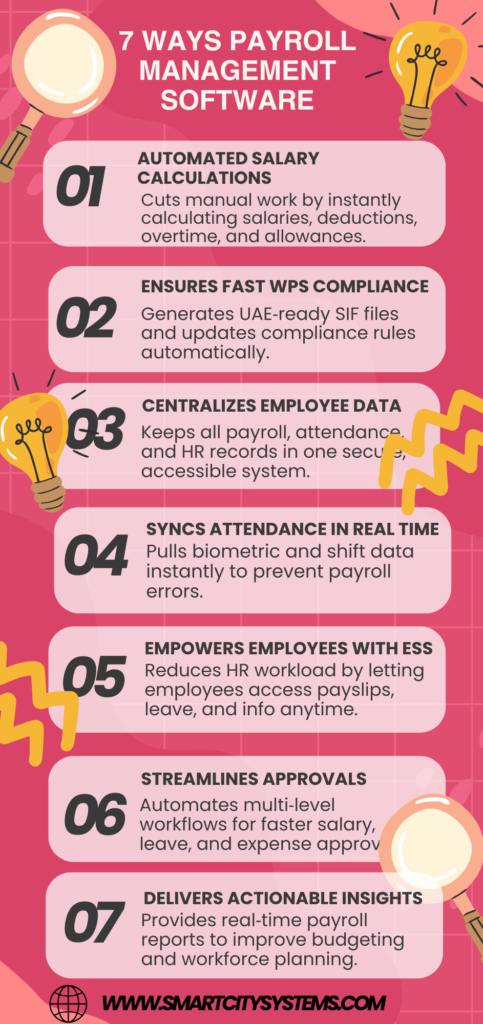
Payroll Management Software
7 Ways Payroll Management Software Increases Business Efficiency Payroll administration is one of the most important responsibilities for any business. Employees expect to be paid accurately and on time, while businesses must comply with tax regulations, labor laws, and reporting requirements. However, handling payroll manually can be time-consuming, error-prone, and stressful. Payroll management software is crucial in this situation. It reduces administrative responsibilities, automates tedious payroll tasks, and enhances business operations. Think of payroll software as the engine of a car—when it runs smoothly, the entire business moves forward without unnecessary delays. Whether you own a small business or manage a growing enterprise, payroll software can transform how you handle employee compensation and workforce management. Understanding Payroll Management Software Payroll management software is a digital solution designed to automate payroll-related activities. These consist of payroll reporting, direct deposits, overtime monitoring, tax deductions, attendance integration, and salary computations. Businesses can use a centralized platform to expedite payroll procedures rather than depending on spreadsheets and manual calculations. This reduces complexity and ensures payroll operations remain organized and efficient. Why Business Efficiency Matters The capacity to accomplish goals with the least amount of time, effort, and resources is known as business efficiency. Effective businesses might focus more on growth, innovation, and customer service rather than on administrative tasks. Payroll is one of the most repetitive administrative functions. Enhancing payroll efficiency has a direct effect on the productivity of the entire company, freeing up more time for strategic tasks for the finance and HR departments. Automates Payroll Processing Eliminates Repetitive Tasks Automation is one of the main benefits of payroll management software. Instead of manually calculating salaries every month, the software automatically processes: Basic salaries Overtime payments Bonuses and incentives Tax deductions Leave deductions Employee benefits Automation significantly reduces the workload on HR and finance teams. Ensures Consistent Payroll Cycles Automated workflows help businesses maintain consistent payroll schedules. Employees receive their salaries on time, every time, without delays caused by manual processing. Increases Productivity Employees may concentrate on higher-value tasks like workforce planning, employee engagement, and performance management when payroll processing is automated. Reduces Human Errors Minimizes Calculation Mistakes Manual payroll calculations often result in errors involving: Salary computations Tax deductions Overtime payments Benefits calculations Even a small mistake can create employee dissatisfaction and compliance issues. Payroll software uses predefined formulas to ensure accurate calculations. Improves Data Accuracy Automated systems eliminate duplicate entries and reduce the risk of incorrect information being entered into payroll records. Builds Trust Payroll processing that is accurate fosters trust between companies and employees. Workers feel more confident when they consistently receive correct payments. Saves Valuable Time Faster Payroll Processing Traditional payroll methods may require several days to complete each month. Payroll management software can process payroll in a matter of hours or even minutes. Quick Access to Information HR managers can instantly retrieve employee payroll records, tax documents, and salary histories without searching through stacks of paperwork. Streamlined Approvals Many payroll systems include automated approval workflows, making it easier for managers to review and approve payroll information quickly. The time saved translates directly into increased operational efficiency. Enhances Compliance Management Stays Updated with Regulations Tax laws and labor regulations frequently change. Payroll software automatically updates compliance requirements, helping businesses remain compliant. Reduces Legal Risks Compliance failures can result in penalties, fines, and legal complications. Payroll software helps businesses avoid costly mistakes by applying the latest tax and labor rules. Generates Compliance Reports Most payroll systems provide built-in compliance reports that simplify audits and regulatory submissions. By automating compliance tasks, businesses can reduce risks while improving operational reliability. Improves Employee Satisfaction Timely Salary Payments Employees value receiving their salaries on time. Payroll software ensures timely payments through automated scheduling and direct deposit capabilities. Self-Service Portals Many modern payroll systems provide employee self-service portals where workers can: View payslips Download tax documents Update personal information Track leave balances This convenience improves employee experiences and reduces HR inquiries. Greater Transparency Payroll information is readily accessible to employees, fostering transparency and lowering misunderstandings over wage computations. Simplifies Record Keeping Centralized Data Storage Payroll software stores all payroll-related information in a single database. This includes: Employee records Salary histories Tax documents Attendance data Benefits information Easy Retrieval Finding payroll records becomes simple and fast, especially during audits or employee inquiries. Improved Data Security Digital payroll systems often include advanced security measures such as encryption, access controls, and automated backups to protect sensitive employee information. Provides Real-Time Reporting Better Decision-Making Real-time reports produced by payroll software assist management in making wise business decisions. Payroll Cost Analysis Businesses can analyze payroll expenses by department, project, or location to identify opportunities for optimization. Workforce Insights Detailed reports provide valuable insights into: Labor costs Overtime trends Employee attendance Compensation patterns These insights support smarter workforce management strategies. Supports Business Growth Scales with Your Organization As companies grow, payroll complexity increases. Payroll software can easily accommodate: More employees Multiple departments Multiple locations Different pay structures Reduces Administrative Burden Growing businesses often struggle with increasing administrative tasks. Payroll automation prevents payroll management from becoming a bottleneck. Supports Expansion Whether hiring locally or internationally, payroll software provides the flexibility needed to support expansion plans efficiently. Integration with HR Systems Creates a Unified Workforce Platform Payroll software nowadays frequently connects with platforms for recruitment, attendance tracking, and HR administration. Eliminates Duplicate Data Entry Employee information entered once can automatically flow across multiple systems, reducing administrative work. Improves Accuracy Integrated systems ensure consistency across HR and payroll records, minimizing discrepancies. Cost Reduction Benefits Lower Administrative Costs Manual payroll processing requires significant labor hours. Automation reduces these costs substantially. Fewer Payroll Errors Payroll mistakes can be expensive. Correcting errors consumes time and resources, while compliance penalties can be even more costly. Reduced Paper Usage Digital payroll systems reduce reliance on printed payslips, forms, and reports, contributing to both cost savings and environmental sustainability. Choosing the Right Payroll Software Assess Your Business Needs Every organization has unique payroll requirements. Consider factors such as: Company size Industry requirements Compliance needs Integration requirements Look for Essential Features Important features include: Automated payroll processing Tax management Employee self-service Reporting capabilities Mobile accessibility Security features Evaluate Vendor Support Long-term profitability depends on consistent software updates and dependable customer service.
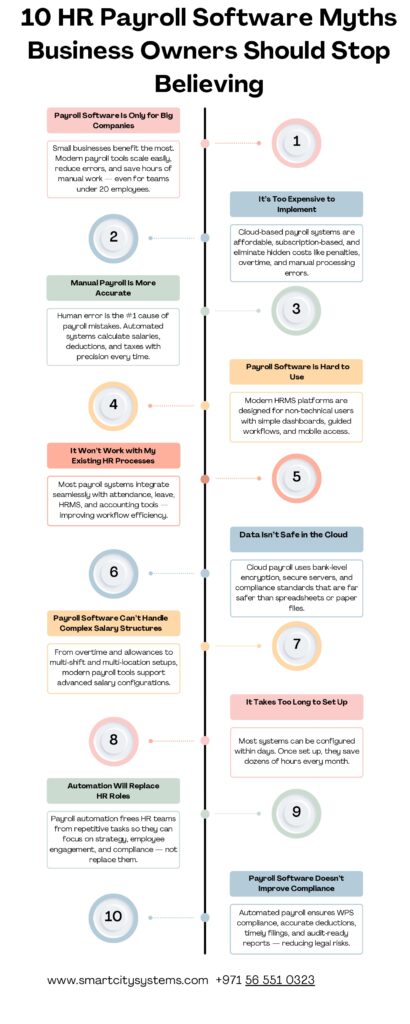
10 HR Payroll Software Myths
10 HR Payroll Software Myths Business Owners Should Stop Believing Running a business is already challenging enough. Between handling employees, managing finances, and keeping customers happy, payroll can quickly become one of the most stressful responsibilities. Yet, many business owners still hesitate to adopt modern HR payroll software due to outdated beliefs and misinformation. Some think payroll software is only for large corporations. Others believe it’s too expensive, too complicated, or even risky. The truth? These myths often prevent businesses from saving time, reducing errors, and improving employee satisfaction. Think of HR software like GPS navigation for your business. You could still use an old paper map and hope for the best, but why struggle when smarter tools can guide you smoothly and efficiently? In this article, we’ll break down the most common myths surrounding HR payroll software and explain why it’s time to leave them behind. Introduction to HR Payroll Software A digital tool called HR payroll software is used to process employee salaries, maintain attendance, manage leaves, compute taxes, and perform other HR-related functions. Instead of spending hours manually calculating salaries or correcting spreadsheet mistakes, businesses can streamline operations with just a few clicks. Today, businesses of all sizes are using payroll software to improve efficiency, accuracy, and employee experience. Yet despite its growing popularity, many myths still surround these systems. Let’s uncover the truth. Why Payroll Management Matters Payroll is more than simply paying employees on time. It directly impacts employee trust, legal compliance, and business reputation. A small payroll mistake can create frustration among employees and even lead to penalties from authorities. Delayed salaries, incorrect deductions, or compliance issues can damage workplace morale quickly. That’s why businesses need reliable systems that minimize human errors and improve transparency. Myth #1 – Payroll Software Is Only for Large Companies One of the biggest misconceptions is that HR software is designed only for big corporations with thousands of employees. That’s simply not true. Small and medium-sized businesses often benefit the most from payroll automation because they usually have limited HR staff and tighter schedules. Even a company with 10 employees can save significant time by automating salary calculations, leave tracking, and tax deductions. All sizes of businesses can benefit from the scalable features and flexible pricing offered by modern payroll software. The Truth Payroll software helps businesses grow efficiently, regardless of company size. Myth #2 – Payroll Software Is Too Expensive Many business owners assume payroll systems are costly investments. But when you compare the cost of software to the cost of payroll errors, compliance penalties, and lost productivity, the software often becomes the more affordable option. Manual payroll processing consumes valuable hours every month. Time spent fixing errors or handling employee complaints also adds hidden costs. Most cloud-based payroll systems now offer affordable subscription plans, making them accessible even for startups. The Truth Payroll software often saves more money than it costs. Myth #3 – Manual Payroll Is More Reliable Some business owners trust manual payroll because they feel “human control” reduces mistakes. Ironically, manual payroll is usually more prone to errors. Humans can easily miscalculate overtime, miss deductions, enter incorrect data, or forget compliance updates. Even a tiny spreadsheet mistake can create major payroll problems. Automated payroll systems reduce repetitive tasks and improve calculation accuracy. Common Manual Payroll Risks Incorrect salary calculations Missed tax deadlines Attendance errors Duplicate data entry Compliance violations The Truth Automation reduces payroll mistakes and improves consistency. Myth #4: Payroll Software Is Hard to Use Years ago, payroll systems were often complicated and required technical expertise. But modern HR software is designed with user-friendly dashboards and simple interfaces. Most platforms allow HR teams to: Process payroll quickly Generate reports instantly Track attendance automatically Manage employee records digitally Many solutions also provide training and customer support. The Truth Modern payroll software is designed for simplicity and ease of use. Myth #5 – HR Payroll Software Replaces HR Teams Some HR professionals worry that payroll automation will replace their jobs. In reality, payroll software doesn’t eliminate HR teams — it empowers them. Instead of spending hours on repetitive calculations and paperwork, HR professionals can focus on more strategic tasks like employee engagement, recruitment, and performance management. Think of payroll software as a helpful assistant, not a replacement. The Truth Payroll software helps HR departments by lightening their administrative burden. Myth #6 – Cloud Payroll Systems Are Not Secure Security concerns are understandable, especially when handling employee salary information. However, modern cloud-based payroll systems use advanced security measures such as: Data encryption Multi-factor authentication Secure backups Role-based access controls In many cases, cloud systems are actually safer than storing payroll data in spreadsheets or physical files. The Truth Trusted cloud payroll systems provide strong data security and protection. Myth #7 – Payroll Software Cannot Handle Compliance Tax regulations and labor laws frequently change, making compliance difficult for businesses. Some people assume payroll software cannot keep up with these updates. The reality is quite the opposite. Modern HR software is regularly updated to align with labor regulations, tax rules, and statutory requirements. Automated compliance tools help businesses avoid costly penalties and reporting mistakes. Benefits of Compliance Automation Accurate tax calculations Timely reporting Reduced legal risks Better audit readiness The Truth Payroll software simplifies compliance management significantly. Myth #8 – Switching Payroll Systems Is Complicated Many businesses continue using outdated systems because they fear migration challenges. Yes, switching systems requires planning, but modern payroll providers often offer migration assistance and onboarding support. The transition process usually includes: Data transfer System setup Employee onboarding Training sessions Testing and verification Most businesses complete migration smoothly with proper guidance. The Truth Switching payroll systems is easier than many businesses expect. Myth #9: Payroll Software Doesn’t Help Workers Some business owners think payroll software only helps management. Actually, employees benefit greatly from automated HR systems. Employee Benefits Include Faster salary processing Self-service portals Easy access to payslips Transparent leave balances Improved communication Employees appreciate systems that provide clarity and convenience. The Truth Payroll software improves employee satisfaction and transparency. Myth #10: Every Payroll Program Is the Same Not all payroll systems offer the same features, flexibility, or support. Some solutions focus only on payroll processing, while others include: Attendance management Recruitment tools Performance tracking Employee self-service Mobile access
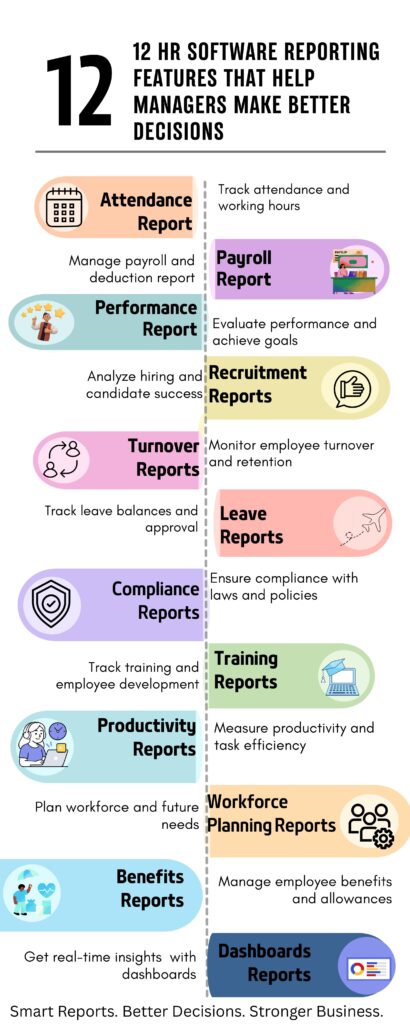
12 HR Software Reporting Features
12 HR Software Reporting Features That Help Managers Make Better Decisions Managing employees without accurate data is like driving a car without a dashboard. You may keep moving, but you won’t know your speed, fuel level, or warning signs ahead. That’s exactly why HR software reporting features are important for modern businesses. Today’s managers need real-time insights to handle attendance, payroll, recruitment, employee performance, and compliance efficiently. HR software transforms raw employee data into meaningful reports that help organizations make smarter decisions faster. Instead of spending hours sorting out spreadsheets and paperwork, managers can access detailed reports with a few clicks. These reports improve productivity, reduce errors, and help businesses plan for future growth. In this article, we’ll explore exactly 12 HR software reporting features that help managers make better business decisions. Employee Attendance Reports Employee attendance reports help managers track working hours, late arrivals, overtime, and absenteeism. These reports improve workforce discipline and ensure accurate payroll processing. With automated attendance tracking, businesses can reduce manual errors and manage shifts more effectively. Additionally, managers are able to spot trends in attendance before they affect output. Key Benefits Improves punctuality Reduces time theft Supports accurate payroll Simplifies shift scheduling Payroll Reports Payroll reports provide complete salary details, deductions, bonuses, overtime calculations, and tax information. This reporting feature ensures employees are paid accurately and on time. Additionally, payroll reporting assists managers in keeping an eye on labor costs and upholding organizational financial integrity. Key Benefits Reduces payroll errors Simplifies tax calculations Tracks overtime costs Improves salary accuracy Performance Evaluation Reports Performance reports allow managers to measure employee achievements, goals, and overall productivity. Instead of relying on assumptions, businesses can evaluate employees using real data. These reports also support fair appraisals and employee development plans. Key Benefits Encourages employee growth Improves performance reviews Identifies skill gaps Supports fair promotions Recruitment and Hiring Reports Hiring reports help organizations analyze recruitment costs, candidate sources, and hiring success rates. Managers can easily identify which recruitment methods deliver the best results. This feature helps businesses hire the right people faster while reducing recruitment expenses. Key Benefits Improves hiring quality Reduces recruitment costs Tracks candidate performance Speeds up hiring decisions Employee Turnover Reports Employee turnover reports show how many employees leave the company and why. High turnover can increase hiring costs and affect productivity. By understanding resignation patterns, managers can improve employee satisfaction and retention strategies. Key Benefits Improves employee retention Identifies workplace issues Reduces hiring expenses Supports better engagement Leave Management Reports Leave reports track annual leave, sick leave, unpaid leave, and employee holiday balances. Managers can quickly view employee availability and avoid scheduling conflicts. Automated leave reporting makes approval processes faster and more organized. Key Benefits Prevents staffing shortages Simplifies leave approvals Improves workforce planning Ensures policy compliance Compliance Reports Compliance reporting helps businesses follow labor laws, company policies, and government regulations. These reports maintain accurate employee records for audits and legal purposes. Organizations can avoid penalties and maintain transparency with automated compliance tracking. Key Benefits Reduces legal risks Supports audits Maintains accurate records Improves policy compliance Training and Development Reports Training reports help managers track employee learning progress, certifications, and completed courses. This feature ensures employees receive proper skill development opportunities. Businesses can also identify training gaps and improve workforce capabilities. Key Benefits Tracks employee learning Identifies skill shortages Improves workforce development Supports career growth Employee Productivity Reports Task completion, project performance, and personnel efficiency are all measured by productivity reports. Managers can identify high-performing employees and detect workflow problems quickly. It helps companies track performance and continuously increase efficiency, much like a fitness tracker for your employees. Key Benefits Improves task management Increases accountability Enhances team performance Identifies workflow delays Workforce Planning Reports Workforce planning reports help organizations forecast future staffing requirements and resource allocation. Managers can prepare for expansion, seasonal demand, or organizational restructuring. This reporting feature supports smarter long-term business planning. Key Benefits Supports future planning Prevents understaffing Controls labor costs Improves resource management Benefits Administration Reports Benefits reports help businesses manage employee insurance, bonuses, allowances, and retirement plans efficiently. Managers can analyze benefit usage and control overall costs. Providing the right employee benefits also improves job satisfaction and retention. Key Benefits Improves employee satisfaction Tracks benefits costs Simplifies administration Ensures accurate enrollment Real-Time Dashboard Reports Real-time dashboard reporting provides instant access to key HR metrics through visual charts and summaries. Managers can monitor attendance, payroll, hiring, and performance data from one centralized dashboard. Without having to wait for manual reports, this capability enables organizations to make decisions more quickly and intelligently. Key Benefits Provides instant insights Improves decision-making Enhances data visibility Supports real-time monitoring Conclusion HR software reporting features play a major role in helping businesses manage employees more effectively. From payroll tracking to workforce planning, these tools provide accurate insights that improve decision-making and business performance. Managers no longer need to rely on manual spreadsheets or guesswork. With the right HR reporting features, businesses can improve productivity, reduce errors, increase employee satisfaction, and plan for future growth with confidence. As companies continue to grow, investing in advanced HR software reporting tools can become one of the smartest business decisions for long-term success. FAQs 1. What are HR software reporting features? HR software reporting features are tools that generate detailed employee-related reports such as payroll, attendance, recruitment, and performance analysis. 2. Why are HR reports important for managers? HR reports help managers make informed decisions using accurate employee data and workforce insights. 3. Can HR software reduce payroll mistakes? Yes, HR software automates payroll calculations and reporting, reducing manual errors significantly. 4. How do attendance reports help businesses? Attendance reports improve workforce discipline, track working hours, and support accurate payroll processing. 5. What is the main advantage of real-time HR dashboards? Real-time dashboards provide instant access to important HR data, helping managers respond quickly and make faster decisions.